Understanding the GDAL vector data model
GDAL has an overview of its vector data model, which is generally pretty good. However, grasping it from prose was still kind of hard for me, so I quickly decided to create some diagrams to help me understand everything.
The basic data model is summarized in the following diagram:

Very quickly: A file (e.g., a Shapefile) is encoded as a Dataset. A Dataset contains some Layers, which themselves contain Features. A Feature is something concrete on the map; thus, it has a geometry. It also has a user-defined field list for all kinds of metadata a feature might have.
Here I describe these concepts again in slightly more detail:
Geometry: A concrete geometry, e.g., a Point or a MultiLine. It has a spatial reference, but usually, this is shared among the whole dataset.
Feature: Contains exactly one geometry. It exists as a first abstraction to a geometry, s.t. it can now include other non-geographic fields. For example, a feature that encodes a tree will have the location of that tree stored as a Point in its geometry and the tree type in the fields of the feature.
Layer: A layer is a list of related features. According to ESRI, one can think of a layer as a legend item on a paper map. For example, all points showing cities will go into a ‘cities’ layer. A layer has a name and, just like a Dataset, it can have metadata (this depends on the actual format).
Dataset: A dataset represents, typically, a file. (Though it can also represent data in, for example, a PostGIS database) A dataset has a name (usually the filename) and maybe metadata (this depends on the file format). Finally, a dataset contains zero or more layers.
Concretely, some of these classes are abstract, while others aren’t. Dataset, for example, is implemented by its actual Driver, which is file-format-specific.
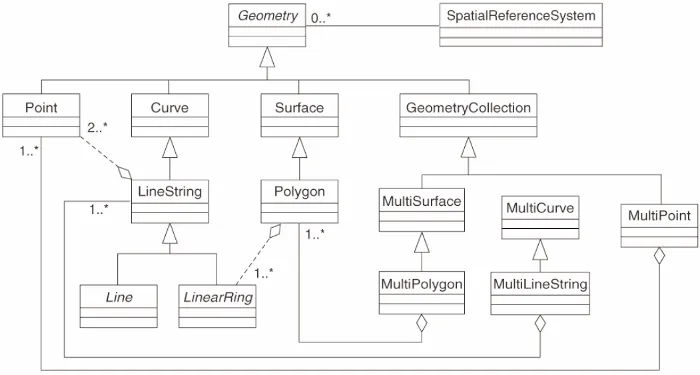
Geometry is also abstract. It is implemented by many different geometries. These are found in the following picture which I found in the QGIS documentation: